There is not a single day in our lives when we don’t use a phone and surf the internet, as it has become an integral part of our personal and professional lives. But the thing is, regardless of this routine, we still sometimes cannot identify a secure platform and are often stuck within the pages of fraudulent domains. Then, what is a website link that one can actually trust?
Well, we will answer this question in detail to clear up all your confusion, along with some best practices of link creation.
What is a Website Link?
A website link is a clickable web address resource that can be embedded in any format, like text, video, image, etc which transfers users to different web pages by scanning different layers of elements like HTTPS, domain name, and final destination, which is present in the browser.
Types of Website Links
- Internal links: They help to foster a connection between two webpages that are co-related or infused for marketing purposes.
- External links: Primarily, external links are used for citation of credible sources and improving domain and page authority metrics.
- Download links: They help to transfer users to package installation setups or directly download media from their browsers.
- Email links: Best for marketing campaigns as they are attached in emails and branding messages sent to consumers, which directly hops them to the website.
Why Website Links Are Important
Website links are important today for so many reasons, and most of them are centered around improving click interaction and transferring them to the designated web addresses without any delays. Here are some benefits that come with perfect website links.
- Easy navigation: Accessible navigation allows users to spend more time on the platform, which opens new gateways for conversion or data submissions.
- Better user experience: When users reach the relevant destinations, they tend to explore more and get satisfied with the result; that’s the best way possible to improve user experience.
- SEO benefits: Web links that are optimized and short are best for so many SEO practices like interlinking, external linking, anchoring, etc.
- Content discovery: Users can easily trace down your content if your website link is constructed precisely without any loose ends, and the hassle of finding relevant information vanishes.
For websites with extensive content, multiple service pages, and complex navigation, working with an enterprise web development company can help create a well-structured linking system that makes information easier to discover and improves the overall user journey.
What Is a URL?
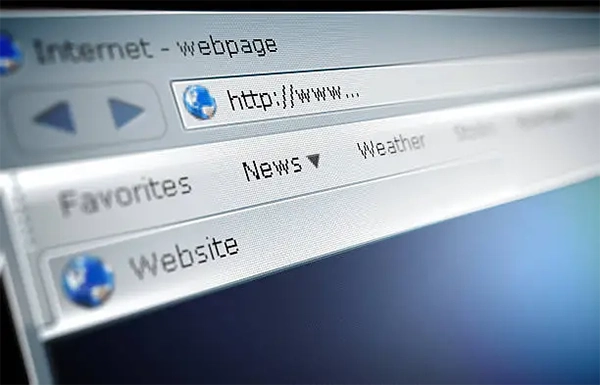
URL, which is also known as a web address, is a very versatile string of words that is used for tracing the destination of a particular online resource within the browser. They play a vital role in storing web utilities like pages, images, user data, videos, package installers, etc.
Parts of a URL
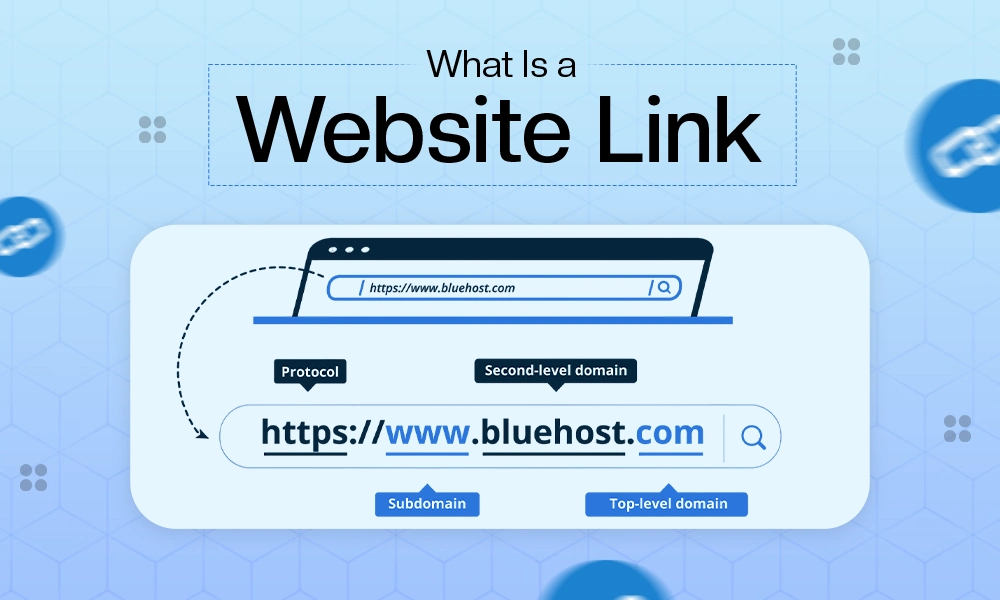
A URL consists of some crucial parts that allow web browsers to find the exact location of a link; each component here has an integral role and shapes the overall user experience, which is also secure from every end. Let’s see how each element works:
- Protocol (HTTPS): Hypertext Transfer Protocol Secure, which is also called HTTPS in layman’s terms, but it is the most important part of the URL formation because it helps to transfer data between your web browser and website through secure encryption.
- Domain name: It is a very unique and easy-to-type web address that takes you to your searched query without typing all the numerical attributes present in the URL. For example: Wikipedia.org is the domain for the URL: https://en.wikipedia.org/wiki/Main_Page.
- Subdomain: Similarly, subdomains are also a unique representation of the different webpages present in the website to allow easy navigation for the users who are typing in their browsers. The best example here would be en.wikipedia.org.
- Path: The path in a URL identifies the specific resource, file, or location on a web server that a user wants to access.
- Query parameters: Query parameters are extensions of a URL used to send additional data to a server, appearing after a question mark (?) as key-value pairs separated by an ampersand (&).
Read more: DIY Site Builder: The Complete Guide to Creating a Website in 2026
URL vs Website Link
| URL | Website Link |
| URL is basically a long strip of typographical elements that curates a web address for a specific website or media file. | A website link is a clickable resource that stores the web address in varied formats like images, texts, PDF files, etc. |
| A URL is determined by the security protocol of HTTPS. | A link is used to add elements and data into a specific unit. |
| A URL can store the destination of a single web page. | A link can store multiple URLs. |
Definition of a Hyperlink
A hyperlink is somewhat similar to a website link, which also transfers users to different pages, media, or files present in the website. The only thing that makes it a little different is its position, as hyperlinks are mostly present within the framework of cited documents and play a vital role in practices like interlinking and improving SEO metrics like bounce rate reductions.
Different Types of Hyperlinks
Hyperlinks are usually used for interlinking to improve user retention, which is why they are placed in locations where the audience can interact easily. That’s why hyperlinks are of varied categories like:
- Text hyperlinks
- Image hyperlinks
- Button links
- Email hyperlinks
- File download links
How to Create a Website Link
Creating a website link is a convenient task, as there are no complications or technical factors involved. You can opt for these three methods for the easiest conversion of web addresses:
(Targets “how to create a website link”)
- Copy and Share a Website URL: The easiest way to make any link is to copy pasting the entire URL into the clipboard and share it through your preferred messaging apps.
- Add Website Links in Word Processors: In word processors like Google Docs and MS Word, you can use the shortcut CTRL+K by selecting any text and pasting the URL of domains or sub-domains.
- Create Links on Social Media: If you have completed a web development project and want to promote it on social media platforms, you can add your URLs in your bio, stories, and posts, which allows users to click on them directly. The only thing you have to keep in mind here is that you have to use URL shorteners, as long URLs are often ignored.
Common Types of URLs
URLs can be different types, as people not only use them for website redirection but for fulfilling many other purposes, which are important for both web design and database management. A well-planned URL structure should also complement the overall appearance and usability of a website, which is why professional web design services can help businesses create intuitive navigation and layouts that make important pages easier to access. Let’s uncover them:
- Homepage URLs: It is a type of URL that opens the gateway for the first entry point of any website, as it presents the homepage, which is also known as the main domain address.
- Page URLs: This is especially important for online stores, where product, category, and checkout pages need to follow a logical structure. An e-commerce website development company can help businesses create scalable page structures that make products easier for visitors to find.
- Image URLs: As the name says, image URLs are basically a numerical strip of words and numbers that take you to the online image resource as per the prompt.
- File Download URLs: These URLs are highly flexible and optimized as they store the downloadable content in the form of package installers.
- Secure HTTPS URLs: Secure HTTPS URLs are considered the safest types of URLs as they are capable of protecting user data from all the malicious elements present on the browsers and have the ability to store any type of installation package or website.
Best Practices for Using Website Links
Whenever you use a website link or try to make one, don’t just use it casually; instead, try to follow some of the best expert-driven practices that will make the user experience smoother and faster than ever before. The best ones are mentioned below:
- Use Descriptive Anchor Text: Using descriptive anchor text rather than generic ones attracts more user attention and improves click-through rates and retention factors significantly, without any serious effort.
- Keep URLs Short and Readable: Always try to craft URLs that are short and readable instead of long and unrecognizable ones because anyone can easily type them and reach the desired destination.
- Avoid Broken Links: Never add a broken URL that doesn’t belong anywhere to any links, as it confuses users who are willing to click where there will be no results
- Use HTTPS Whenever Possible: HTTPS (Hypertext Transfer Protocol Secure) is the security standard for every web link that exists on the internet; if the links don’t have it, most likely people won’t click them. That’s why integrating it in every web page is important.
- Regularly Check Link Functionality: Constantly checking the functionality of links, their typography, and security is very important to ensure that users are having smooth redirection and reliable security.
Read more: What Is Enterprise Web Development? Complete Guide to Enterprise Website Development
Common Website Link Problems and How to Fix Them
In the process of link creation or while opening the website, there is a possibility of unwanted errors that can happen at any time if there are some loose ends in the framework, and not fixing them early can be disastrous for the performance and stability of the webpages.
1. Broken Links (404 Errors)
The 404 error is one of the most common problems that happens with a website link, as it is mainly caused by three reasons: owner removal of the web page, transfer to a different address without a redirect, or typographical error in web links.
2. Redirect Loops
Redirect loops are also a very frustrating scenario from a user’s point of view, as they don’t allow them to view the page they are looking for; instead, the browser redirects them from one page to another or transfers them to the same pages again and again. This technical glitch can be fixed easily by updating plugin drivers, fixing errors in the web address, and changing HTTP/HTTPS security settings.
3. Incorrect URL Formatting
Formatting a URL with incorrect names, words, alphabets, or even forward slashes (/) can break the entire link architecture, and it will be inactive or inaccessible for a while, which leads to a massive increase in bounce rates. Undoing the mistakes that were made earlier during formatting will fix this problem instantly.
4. Expired or Moved Pages
Keeping expired pages in the form of links on the webpages will do nothing but confuse the audience, as they won’t get any result when they click on, it is better to remove them as soon as possible. Also keep in mind that you have to change or update the attributes of pages which are displaced to another online address. Regular website maintenance services can help businesses identify broken links, outdated URLs, redirect issues, and accessibility problems before they negatively affect visitors or the overall website experience.
5. Permission or Access Errors
Permission or access errors are also very concerning, as they forbid visitors from viewing what’s behind the link and getting the information or the piece of media they are looking for. To repair this, update the browser settings to Advanced and clear browser data.
Mistakes to Avoid When Creating Website Links
Last but not least, we have to address some common mistakes that almost every beginner makes, and that ruin the entire structure of website links. Some of these mistakes happen because of basic negligence, yet most occur due to a lack of accurate knowledge. Below we have mentioned errors that are frequent and that one should always avoid.
1. Using Long, Confusing URLs
Using long and unwanted elements in the URLs creates a mess in your web link structure because it lowers the trust of users, decreases the security of the domain, and hampers the tracking of web addresses. Applications like URL shorteners or practices like removing strings or short words do the best job.
2. Linking to Insecure Websites
Sometimes interlinking your content with websites that have a poor domain and page authority or lack HTTPS can damage the reputation severely, as malicious entities can enter your server and harm the user data. Instead, check all the security before interlinking.
3. Forgetting to Test Links
Not testing the availability, server response, credibility, and loading speed of the link might actually ruin the entire framework of the link because users become unable to use it and check out what’s present inside of it.
4. Using Generic Anchor Text Like “Click Here”
Vague anchor texts like “click here” and “click now” do nothing good in 2026, as new search engine policies find them irrelevant, and the CTR (click-through rates) of these texts are usually very low and disengaging.
5. Overusing Links on a Page
Creating so many links on a webpage or adding irrelevant anchor texts is something that you must avoid, as it is not appropriate for improving readability or SEO practices. Use links that actually support the architecture of the content and enhance the viewer’s attention, rather than stuffing it with multiple pieces of jargon.
Frequently Asked Questions
What is a website link?
Ans: A website link is a clickable source unit that takes you to different online destinations with secure measures. It is mostly embedded in the form of text and images so that it can be easily identified.
What is the difference between a URL and a website link?
Ans: A URL is an address of a particular online domain that exists on the internet, while a website link is a clickable resource embedded in different formats of media that takes a user to a particular website.
What is a web address?
Ans: A web address, which is also known as the Uniform Resource Locator (URL), is a string of characters that decodes the destination of a particular file, page, or image existing on the internet, which can be accessed by clicking.
What is the definition of a hyperlink?
Ans: A hyperlink is pretty similar to a normal link because it is also present in similar formats like alt tags and anchor texts, which redirect you to different URLs.
How does a web link work?
Ans: The moment you click on a web link, the small-coded directories find the destination og that particular web address across the internet using HTTPS protocols.
How do I create a website link?
Ans: To create a website link, first click on the Uniform Resource Locator of the webpage, then copy that, and after that, paste that URL in your preferred format like an image, text, or file. Doing this will complete the process of link making.
How do I make a URL link clickable?
Ans: You can easily make a URL link clickable by copy-pasting it on alt tags, images, and anchor texts.
Are all website links URLs?
Ans: Absolutely yes, all website links are URLs (Uniform Resource Locators) because they all have their unique IP address and online destinations.
Why do some links start with HTTPS?
Ans: Links that start with HTTPS (Hypertext Transfer Protocol Secure) ensure their security and credibility on online servers.
Final Thoughts
This was all about website links and how they work according to different use cases to fulfill various needs. Undoubtedly, they have become an integral part of communication, marketing, branding, and business management, as they allow secure transfer of users to different platforms within a fraction of a second. Secure websites empowered by HTTPS are considered safe gateways for storing user data and conducting actions for crucial practices like transactions or data extraction.
In fact, nowadays, properly functioning website links also improve the metrics of search engine optimization like domain authority, user retention, and faster reload speed, which also boosts conversion rates. At last, we just want to say that’s not the end of the road; stick with Digitaladdex for more website-themed content.