HTTP status codes are three-digit numbers that web servers send to show what happened to your web request. While using the internet to find new show recommendations or research for a project, you might’ve encountered these numerical pop-ups on your screen that you don’t understand. Most netizens are unaware of HTTP status codes and their classification.
Every time you click a link or search for something, the server responds with a code indicating the request succeeded, failed, or moved elsewhere.
So instead of refreshing your browser or retyping the correct URL again and again, you need to understand these codes to troubleshoot web issues and boost your site/application performance. If you are new to the technical side of websites, this overview of what web development involves can help explain how browsers, servers, and website components work together.
What Are HTTP Status Codes?
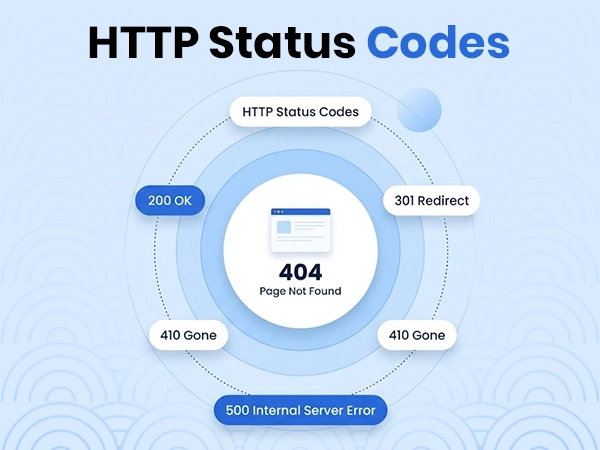
HTTP status codes are three-digit numbers sent by a web server in response to a client’s request (such as a browser loading a page or an app calling an API) to show the status of your request. These codes are generated and processed every time you click a website link, open a webpage, fill a form, or interact with any element on the internet.
The 5 Classes of HTTP Status Codes
The HTTP status codes are classified into 5 groups based on their first digit. Each indicates a unique response from the server. The numbering helps to understand the outcome of a request at a glance. They range from 1xx to 5xx.
These codes represent issues from both the server and the client end. Here, we are going to break down each numerical series to help you pinpoint if the request was processed successfully or not.
1xx Informational Responses
The 1xx informational codes indicate that the server has received your request from your browser and that it is processing that request. These codes temporarily tell your browser to keep waiting for a response. You’ll never notice them because they happen behind the scenes within the website’s infrastructure and do not represent any final success or failure.
Common 1xx Codes
- 100 Continue: The server has received the request headers, and the client should proceed to send the request body.
- 101 Switching Protocols: The server is willing to comply with the client’s request to switch protocols.
- 102 Processing: The server is still working and expects the client to wait.
Read more: HTML Background Image: How to Add and Style Background Images
2xx Success Codes
2xx Success codes mean the server received, understood, and processed the request successfully. The most frequently used code in this group is 200 OK, which tells your browser to load the webpage as expected. These are the best codes to see because they confirm that your website is performing exactly as it should.
Common 2xx Codes
- 200 OK: The standard response for a successful HTTP request. The data was delivered.
- 201 Created: The request has been fulfilled, and a new resource was successfully created on the server.
- 202 Accepted: The request has been accepted for processing, but the processing has not been completed yet.
- 204 No Content: The server successfully processed the request, but there is no content to return in the response body.
3xx Redirection Codes
3xx redirecting codes are an indication to your browser that the page you want to visit has moved to a different web address. The server automatically redirects you instead of just showing you an error page. So, you get redirected without manually typing a new address.
For example, the 301 Moved Permanently code informs search engines that there has been a permanent change of address of the page. When changing page URLs, also make sure the new address is clear and meaningful; this guide explains what a vanity URL is.
Common 3xx Codes
- 301 Moved Permanently: The requested page or resource has been moved to a new URL. Search engines update their links to the new address.
- 302 Found (Temporary Redirect): The resource is temporarily located at a different URL. Browsers should continue using the original URL for future requests.
- 303 See Other: The server directs the client to a different URL using a GET request (often used after a form submission to prevent duplicate posts).
- 304 Not Modified: The resource has not changed since your last visit. The browser uses its saved local copy to load the page faster.
4xx Client Error Codes (HTTP Error Codes You’ll See Most)
4xx Client Error Codes mean that something did not go as expected with the request sent by the user or browser. These show that the page cannot be loaded because of a mistake on the client side, like accessing a broken link or trying to access a page that no longer exists.
You might have seen a 403 Forbidden, which appears when access is blocked, and 401 Unauthorized, when a login is needed. These errors can be easily fixed by ensuring you’ve spelled everything correctly, logging in, or clearing your browser cache. A properly configured site should also guide visitors through clear layouts and navigation; learn more about professional web design services.
Common 4xx Codes
- 400 Bad Request Error Code: The server cannot process the request because the client sent data with invalid syntax or a malformed message.
- 401 Unauthorized: The client is not authenticated and must provide valid login credentials.
- 403 Forbidden: The server knows the client’s identity, but the client does not have permission to access the resource.
- 404 Not Found: The server cannot find the requested URL or resource because the page does not exist or has been deleted.
5xx Server Error Codes
5xx Server Error Codes show that your request from the browser was completely valid, but the destination web server failed to fulfill it. This problem lies completely with the website hosting and is not related to your computer, as in the case of client errors.
Common 5xx Codes
- 500 Internal Server Error: A generic catch-all message showing that an unexpected crash prevented the server from fulfilling the request.
- 501 Not Implemented: The server does not support or recognize the functionality required to fulfill the request.
- 502 Bad Gateway: The server acting as a gateway or proxy received an invalid response from an upstream server.
How to Check HTTP Status Codes?
Checking HTTP status codes helps you troubleshoot broken links or server errors faster. If you want to check HTTP errors for a website or API, you can use different methods ranging from built-in browser tools to command-line utilities listed below:
- Browser Developer Tools: Press F12 (or right-click and select Inspect) to inspect the page. Go to the Network tab and refresh the page to view the live status code. Browser inspection is also useful when checking how a page’s design and scripts behave; web teams may use web design software during the design and testing process.
- Command Line Tools (cURL): If you prefer using the terminal, cURL is another way to fetch headers without downloading the entire page content. Open your terminal and run curl -I https://example.com.
- API Testing Tools: If you are testing APIs or backend routes, specialized tools like Postman and Bruno provide an easy way to check HTTP status codes.
Best Practices for Using Status Codes Correctly
It’s important to implement these HTTP status codes correctly for a good user experience. Here is a list of best practices to make sure web browsers and search engine bots interact with your server without any issues.
- Web servers should not throw a general success message when the page fails to load. The message should be according to the situation happening. Even if you design a good message for users, the backend message should match that. This is an important part of reliable website development, especially for complex sites and applications.
- Users may not be technically fluent, so using custom error pages will help guide lost visitors back to the main content. If you are choosing how to build a site, compare a custom website with a website builder and consider how much control you need over error handling and other technical features.
- Continuously tracking errors is important, especially server-side issues. Set real-time alerts to notify you the moment a server crash happens. Regular checks are also part of ongoing website maintenance.
- Always include a text body inside the response to explain why the request failed. It helps external developers debug the application faster.
- You should always run a site crawl right after deployment in case of changes or migrations. Doing so guarantees that your redirect paths remain clean and accessible. For larger platforms with complex integrations, an experienced enterprise web development company can help plan robust site architecture and deployment processes. These checks are equally relevant to online stores, where e-commerce website development needs to account for product pages, checkout flows, and redirects.
Frequently Asked Questions
What are HTTP status codes?
HTTP status codes are standard three-digit numbers sent by a web server in response to a client’s (such as a browser or app) request. They identify requests and tell you about responses like success, redirection, or failure to get permission.
What is the difference between 401 and 403?
The core difference between 401 and 403 is that 401 Unauthorized means you are unauthenticated (the server does not know who you are), while 403 Forbidden means you are unauthorized (the server knows who you are, but you do not have permission to access the resource).
What does a 400 Bad Request error mean and how do I fix it?
A 400 Bad Request error means the web server cannot understand your request because the data or URL sent by your browser has a syntax error or is invalid. Retyping the URL or refreshing the page fixes this issue in most cases.
Is a 404 error bad for SEO?
Not in this case; error 404 is not bad for SEO, as Google does not penalize rankings if a page shows this response. This is because browsers think it is a normal server gateway issue that can be resolved easily.
What is the difference between a 301 and 302 redirect?
The basic difference between 301 and 302 redirects is that a 301 redirect refers to a permanent move that passes full SEO link authority to the new URL, while a 302 redirect is a temporary settlement that keeps the original URL indexed and keeps the SEO achievement intact.
What causes a 500 Internal Server Error?
A 500 Internal Server Error simply means that there is something wrong on the server’s end and your access request won’t be fulfilled. It can happen due to unexpected breakdowns or some disruption in the site framework during maintenance.
What are the five classes of HTTP response codes?
The five classes of HTTP response codes refer to the classification of different browser responses. They are 1xx (Informational), 2xx (Success), 3xx (Redirection), 4xx (Client Error), and 5xx (Server Error).
Conclusion
HTTP status codes tell you exactly whether a web request was successful, failed, or needs a redirect. These are basically 3-digit codes that you can now decode and resolve easily. Also, correctly implementing these errors prevents unauthorized access and ensures search engine bots can crawl your pages without getting stuck on errors.
So, if you are building a website/application, using the right HTTP status codes is very important for your site to be functional, secure, and SEO optimized.
Sources:
- How HTTP status codes affect Google’s crawlers – Google for Developers
- HTTP status codes – Google Cloud Documentation