A 502 Bad Gateway error blocks visitors from loading your pages. This error means that one server acting as a middleman (or gateway) received an invalid or broken response from the main server. It is a server-side error that occurs when the origin server crashes, runs out of memory, times out, or gets blocked. It can be fixed by checking server logs and restarting failed services. It is important for both visitors and website owners to understand what causes a 502 gateway error and how to fix it so that you do not get stuck surfing and your website stays active.
Quick Answer: 502 Bad Gateway is a server-side error. It means a middleman server received a broken reply from the main server.
- What Does 502 Bad Gateway Mean?
- How a 502 Error Appears (Common Messages)
- Common 5xx Server Errors: 500, 502, 503, and 504
- How to Find What’s Causing the 502?
- Causes of a 502 Bad Gateway and How to Fix Each
- Platform-Specific 502 Errors
- What Visitors Can Try
- How to Prevent 502 Errors
- Can 502 Errors Hurt SEO?
- FAQs
- Conclusion
What Does 502 Bad Gateway Mean?
A 502 Bad Gateway error means that one proxy or gateway server on the internet gets an invalid/broken response from another server when trying to load a webpage. Gateway because it acts as a middleman. Your browser rarely talks directly to the main server. So, the middleman waits for the response from the main server, and if it sends back an error or drops the connection, the middleman cannot complete the job and shows you a 502 error.
Here is how the request chain works behind the scenes:
Browser → Gateway/Proxy/CDN → Upstream server
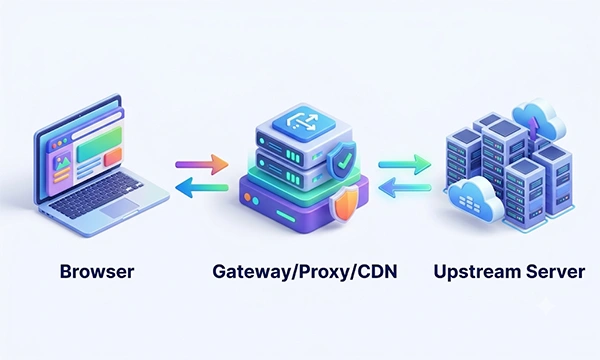
- The Browser is the app (Chrome, Safari, Edge, Firefox, etc.) you use to view a website.
- The main upstream server, where the website’s actual code, files, database, etc. lives. These components are built and maintained through web development processes.
- The main upstream server, where the website’s actual code, files, database, etc. lives.
Note: A 502 Bad Gateway error is a server-side error (part of the 5xx HTTP status code family) because this communication breakdown happens between two servers. It is not a client-side error.
How a 502 Error Appears (Common Messages)
A 502 Bad Gateway error appears as a blank/custom error webpage instead of the site you want to visit in your browser. This happens due to a server communication failure. It’s not always “502 Bad Gateway”; wording can change depending on the website’s server software or Content Delivery Network (CDN).
Here are the most common 502 error code messages. Regardless of the phrasing, every message variation points to the same server-side breakdown.
| Error Message Variant | Platform |
| 502 Bad Gateway | Nginx and generic web servers |
| Error 502 / Bad Gateway | Cloudflare (CDN) |
| HTTP Error 502 – Bad Gateway | Microsoft IIS and Azure |
| 502 Proxy Error | Apache HTTP Server |
| Temporary Error (502) | Google (Gmail, YouTube, Search) |
| 502 Service Temporarily Overloaded | High-traffic sites and load balancers |
| 502 Bad Gateway (Unbranded) | Cloudflare (Internal edge) |
Common 5xx Server Errors: 500, 502, 503, and 504
All 5xx HTTP status codes indicate a server-side failure, i.e., the issue lies with the website and not with your device or internet connection. Whenever a server fails to complete a valid request, it sends back a 3-digit code starting with the digit 5 to show what broke. Error 500, 502, 503, and 504 all stop a webpage from loading; they point to a different failure in the server chain.
Comparison of the Most Common 5xx Server Errors (500, 502, 503, and 504)
| Code | Meaning | Who Is at Fault? | Cause |
| 500 Internal Server Error | The main server faced an unexpected problem and could not load the page. | Main server | Broken website code, wrong plugins. |
| 502 Bad Gateway | A proxy or gateway server received a broken reply from the main server. | Connection between proxy and origin server | Crashed upstream server, out of memory, firewall block, or DNS misconfiguration. |
| 503 Service Unavailable | The server is temporarily unable to handle requests right now. | Origin server | Scheduled server maintenance |
| 504 Gateway Timeout | A proxy or gateway server failed to get a reply from the main server on time. | Upstream server response speed | Slow database queries, processing, network delay, heavy server processing. |
502 and 502 errors might be confusing because both involve a middleman server (like a proxy or CDN) that fails to complete a request with the main server. The difference is whether the main server replied or stayed silent.
- 502 Bad Gateway (Broken Reply): The middleman reached the main server and the main server answered immediately. The response was corrupted or invalid.
- 504 Gateway Timeout (No Reply): The middleman sent a request to the main server and waited until the connection timer expired. It never received a response at all.
How to Find What’s Causing the 502?
You need to pinpoint which layer in the server chain is rejecting the connection to find out what is causing a 502 Bad Gateway error.
#1 Check Which Layer Returns the Error
First, identify whether the error page is coming from your CDN (like Cloudflare), a proxy, or your origin host.
Inspect HTTP Headers in DevTools:
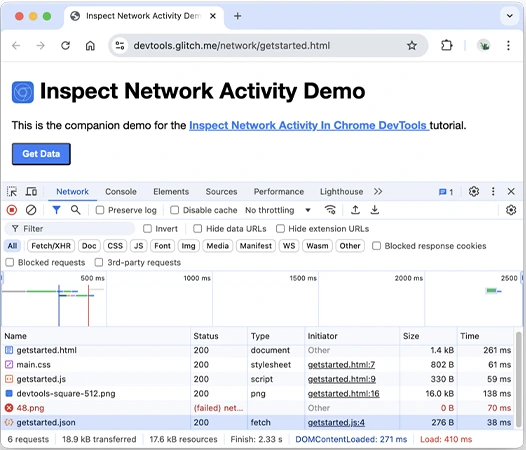
- Press F12 or right-click on your browser and select Inspect.
- Go to the Network tab.
- Reload the page.
- Click the failed request.
- Look at the server header under Response Headers (example: Cloudflare, nginx, or Apache) to see which system generated the 502 response.
Run a cURL Check:
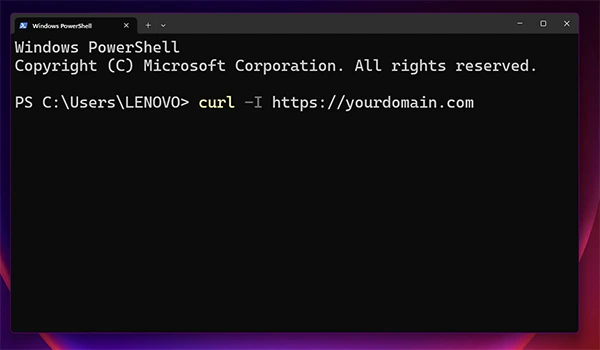
- Open your Terminal.
- Run curl -I https://yourdomain.com (or curl -v https://yourdomain.com for full connection details).
- The output shows the HTTP response headers, SSD handshake status, etc.
#2 Test the Upstream Server Directly (Bypassing the Proxy)
Now, check if the origin server is working on its own or not. To do this, bypass your CDN or reverse proxy.
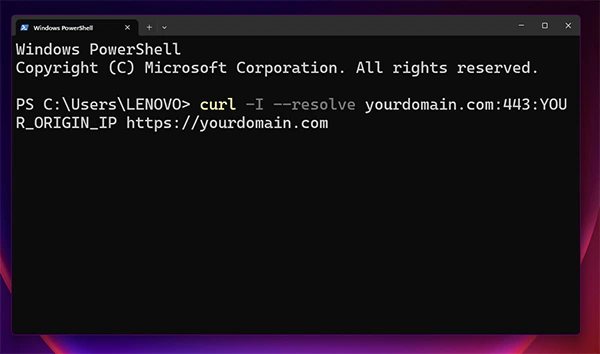
- Open Terminal.
- Run curl -I –resolve yourdomain.com:443:YOUR_ORIGIN_IP https://yourdomain.com in your terminal. (Replace YOUR_ORIGIN_IP with your main host’s IP address)
- Check the output. If the origin server returns a 200 OK status, your main website is healthy. If it fails, the problem is inside your origin server.
#3 Read the Proxy and Application Error Logs
Check your server logs to find the actual technical reason the connection dropped and caused a 502 Bad Gateway.
You may find error logs like:
- upstream prematurely closed connection,
- connection refused, or
- upstream sent too big header.
Once you see which message appears in proxy logs, cross-check the timestamp against your application and backend logs. A full-stack developer may be able to investigate issues across the application and server layers.
Causes of a 502 Bad Gateway and How to Fix Each
A 502 Bad Gateway error happens when the middleman server, i.e., your CDN or reverse proxy, tries to get a web page, but the main server either crashes or refuses the connection. Now this can happen because of many reasons and to fix it, you need to understand the actual cause of HTTP 502 error.
Let’s see the most common reasons this happens and how you can fix each one.
Upstream Server is Down or Crashed
Your backend application or web service, such as PHP-FPM, Node.js, or Python, has crashed or stopped running. The server has nothing to connect to and shows an HTTP 502 error because the main server is offline.
How to fix it: Log in to your server and restart it. You can also set up an auto-restart tool so it does not need manual assistance every time it goes down.
Wrong Proxy Target
The proxy is aiming at the wrong IP address, port number, or socket. This results in rejection of the request when the proxy knocks at the wrong door.
How to fix it: Open and check the proxy configuration file. Make sure the destination address matches the same port where your app is running.
Server Resources Exhausted
When there’s a sudden rush of visitors or a heavy background script running, it uses up all your server’s RAM. Your server is technically alive but cannot accept new requests from the proxy.
How to fix it: Check your server’s live memory and CPU usage. If your server regularly hits 100% capacity, upgrade to add more memory and raise worker limits. For large-scale websites, enterprise web development may involve planning server capacity and architecture to handle higher traffic demands.
DNS Resolution Failure
If the IP address is outdated for your main server, the proxy will send visitor traffic to a dead or wrong destination.
How to fix it: Check your domain’s A and AAAA DNS records. Update them to match the IP addresses. If your backend IP changes automatically, add a resolver line in Nginx so it always looks up the fresh IP.
SSL/TLS Handshake Failure
An expired SSL certificate disrupts the secure handshake and results in a 502 status code.
How to fix it: Renew any expired SSL certificates and verify that they match your domain name.
Firewall Blocking the Proxy or CDN
CDNs or reverse proxies detect high-volume traffic as a cyberattack and block it. This cuts off the communication with your main server.
How to fix it: Allow all official IP ranges belonging to your CDN or proxy provider. Do this inside your firewall and any website security plugins.
Platform-Specific 502 Errors
The core meaning of a 502 error remains the same everywhere. A 502 error is when a middleman server receives an invalid response from an upstream server. The error is triggered, and the error shown on screen depends on the specific platform handling your traffic. For example, an SSL setting mismatch can cause a 502 error in Cloudflare, and a malformed Lambda JSON output can cause it in AWS API Gateway, etc.
Cloudflare
Cloudflare is a Content Delivery Network (CDN) and security proxy that acts as the middleman between your website visitors and your origin web server. It speeds up load times and also blocks cyberattacks because every visitor request passes through Cloudflare’s network first. If it detects any breakdown, a Bad Gateway 502 error flashes.
- Setting Cloudflare’s SSL mode to Full when your origin server does not have a trusted SSL certificate causes a 502 error. Even setting it to Flexible can cause issues if your origin forces HTTPS redirection.
- Because Cloudflare routes site traffic through its own servers, your host’s firewall may interpret it as an attack and block it. Whitelist Cloudflare’s official IP ranges to restore access.
Amazon CloudFront
Amazon CloudFront is AWS’s global Content Delivery Network (CDN). When CloudFront cannot establish a valid and secure connection, it stops the request and shows a 502 Bad Gateway error.
CloudFront rejects connections because your origin server uses outdated SSL/TLS versions or weak encryption ciphers. They do not match CloudFront’s security policy. Update your origin server to support modern TLS 1.2 or 1.3 protocols.
Read More: 403 Forbidden Error: What It Means and How to Fix It
What Visitors Can Try
Yes, the 502 Bad Gateway error is caused by a problem on the website’s end. There are still a few quick steps you can take from your own device to get the page working again.
- Refresh the page: Wait for 30 to 60 seconds and reload the page. This will clear up any temporary traffic on its own.
- Try another browser: Open the website in a different browser. Even an incognito window can rule out conflicts caused by browser extensions or corrupted sessions.
- Clear browser cache: You need to load a fresh version of the page instead of the saved screen. To do this, just refreshing the page isn’t going to work. Delete the browser’s cached files and cookies.
- Flush DNS cache: Clear your device’s stored DNS records. Restart your router to fix outdated routing paths to the website server.
- Disable VPN or proxy: Third-party tools can trigger firewall blocks on the website. Turn off any active VPN or custom proxy server.
- Check if the site is down for everyone: Use a free online status checker to confirm whether the outage is global or limited to your connection. If the site is down for everyone, you can wait and visit it later.
How to Prevent 502 Errors
The best way to prevent 502 Bad Gateway errors is to build safeguards so minor server glitches never turn serious. You can automate routine maintenance or use website maintenance services to stop temporary errors from spreading across your network. A reliable website should also be designed with performance and stability in mind, which are important parts of what makes a good website.
The following preventive measures keep your middleman proxies and origin server communicating smoothly:
- Set Up Automated Uptime Monitoring and Alerts
Continuous monitoring tools check your website from global locations every minute and notify you the moment a gateway error occurs.
- Use Health-Check Endpoints
Health-check endpoints are dedicated URLs that report whether your server is running properly. Use them to prevent 502 errors. They detect broken servers earlier so you can reroute traffic away from them.
- Implement Circuit Breakers in Your Architecture
A circuit breaker automatically stops your proxy or microservices from sending requests to backend servers again and again. This way pausing traffic prevents failures and gives time to your origin server to recover.
- Automate SSL Certificate Renewals
Expired SSL certificates break the encrypted handshake between a CDN and your origin server. So make sure your SSL/TLS credentials are renewed automatically to prevent 502 status codes.
- Run Regular Load Testing
Load testing helps identify bottlenecks ahead of product launches or campaigns. This practically tests your website against heavy visitor surges, checking how much it can handle.
- Do Not Cache Error Responses at the CDN
Adjust your caching rules to bypass 5xx status codes because, by default, some misconfigured CDNs store 502 error pages and keep serving them even after the origin server recovers.
Can 502 Errors Hurt SEO?
Yes, 502 Bad Gateway errors can definitely hurt your SEO if they last for several days or happen repeatedly. Brief outages do not harm your rankings.
- Short outages are tolerated. That means if there’s a temporary 502 error for a few minutes or hours, it will not affect your search rankings. Google retains your already indexed pages and resumes normal crawling as soon as your server recovers.
- According to Google Search Central’s HTTP status code documentation, continuous 5xx server errors prompt Googlebot to reduce its crawl rate proportionally to the number of failing URLs. So, prolonged or repeated 5xx errors slow crawling and drop pages.
- Track server-side crawl issues by opening the Crawl Stats report (under Settings) and the Page Indexing report inside Google Search Console. Cross-reference those flagged URLs to stop 502 errors from occurring before they cause de-indexing.
FAQs
Is a 502 error my fault?
No, a 502 error is rarely your fault. It is a server-side problem caused by a communication failure between the website’s own servers. This has nothing to do with your computer, phone, home Wi-Fi, etc.
How long does a 502 error last?
A 502 error lasts anywhere from a few seconds to a few minutes. If the error is due to a sudden traffic spike, it clears up within minutes. But if it is caused by broken code or an expired SSL certificate, it will last until the website’s technical team manually fixes it.
Can a 502 error fix itself?
Yes, a 502 error can fix itself if a temporary issue causes it. Temporary issues include network glitches, out-of-memory conditions, crashed background services, etc. Refreshing the page after a minute or two is enough to load the site again.
Why do I only get 502 errors under heavy traffic?
Heavy traffic drains the origin server’s available CPU, RAM, or worker processes. It drops connections when too many visitors request pages at the same time because the main server runs out of capacity to answer the middleman proxy.
Conclusion
A 502 Bad Gateway error simply means a middleman server (like a CDN or proxy) received an invalid or broken reply from the main website server. It is a server-side error. Most 502 errors happen because the backend server crashed, ran out of memory, had an SSL certificate, or was blocked by wrong DNS or firewall settings.
Site owners can fix it by checking server logs, restarting crashed services, and fixing proxy or security rules. On the other hand, as a visitor, you can try refreshing the page or clearing your browser cache to remove the 502 server error.
Sources:
- 502 Bad Gateway – Mozilla Developer
- 5xx – Server error – Microsoft Learn
- Understanding 5xx Errors – Google Cloud
- Inspect network activity – Chrome for Developers