People type “what is a website” on their search engines daily. Students may be completing homework. Business owners may be looking for online resources. Even frequent internet users are sometimes hungry for an explanation of what they are seeing. This question is simple. However, it deserves an answer. The website provides businesses and users with the opportunity to be discovered on the web.
A website is a set of connected web pages, all sharing the same domain name, hosted on a web server, and viewable by a web browser.
Websites are used for various needs, such as sharing information, publishing materials, selling goods, or offering online services.
In this article, we will learn what is website, how it operates, types of websites, and some examples of web pages.
- Quick Answer: Website Definition at a Glance
- Website Definition: What Is a Website in Simple Words?
- Web-page Meaning: What Is a Web Page?
- How Does a Website Work?
- What Is a Website Made Of?
- Static vs Dynamic Websites
- Types of Websites
- Website vs Web App
- Why Do Websites Matter?
- What Makes a Good Website?
- How to Create a Website: A Simple Roadmap
- Frequently Asked Questions
- Wrap Up
Quick Answer: Website Definition at a Glance
In general terms, a website consists of a collection of different web pages joined together under a common domain name. A few terms that can be used for better understanding:
- Website: A collection of web pages hosted under a single domain name.
- Web Page: A single document on a website that contains information, text, images, videos, etc.
- Web Server: The computer-based system that saves the files of a website and delivers them to the user.
- Web Browser: The software program that allows a user to surf the web.
- Domain Name: The link that a user enters in the browser to reach a web page.
Thus, a website can be defined as a place on the Internet where an individual, firm or business entity publishes a piece of information for people with Internet connections.
Website Definition: What Is a Website in Simple Words?
When it comes to knowing website definition, it is an online environment where a person, company, or organization displays information that anyone can see. You just need to enter the website’s address, and your browser will load it from the server. Businesses planning a new online presence can explore our website development services to understand how a professional website is planned and built.
In a nutshell, a website can be compared to a shop. A shop has a specific address, different areas for different categories of products, and several ways to reach those areas. Similar to a shop, a website has its unique web address, many pages, and connections between them.
Shop-on-a-street analogy
Imagine the internet as a street with lots and lots of shops. Each shop has its own address, front door, and rooms inside. There are many similarities between the shop and the website:
The domain name is similar to the shop address, which you have to know in order to find the shop.
- The web server is like a building, where you can find everything.
- The web pages fit into the rooms and shelves, where you can find various things.
- The browser is like a person walking along the street and entering the shop.
Just like a store owner chooses the products to sell and how they are arranged, a website owner makes choices about how the website will look and the content that it will post.
The three components of the Website
- Webpages. Each website is composed of multiple pages, and each page has its own content in the form of text, images, videos, etc. Even the simplest website consists of a homepage and at least one page, which varies in its content.
- Single domain. Even if webpages are completely different, they reside under the same umbrella domain name. For instance, BBC has two pages, bbc.com/news and bbc.com/sport, but they are considered to belong to the same website since the domain name is the same.
- Hyperlinks and menus. All pages are connected through links and menus, which makes the website functional regardless of how many pages it has.
The structure and presentation of these pages are important parts of web design services, which help make a website clear, consistent, and easy to navigate.
What websites are used for
Websites can fulfil various objectives in the day-to-day life of a user and for business. The following are examples of popular website functions:
- Information sharing: Posting news feeds and writing articles, tutorials, and educational materials.
- Business promotion: Showing the organization’s info, the products and services available, and the contact data.
- E-commerce: Facilitating order placement and payment online.
- Building communities: Enhancing interaction between users via forums, social networks, and other communication platforms.
- Providing services: Making digital services available online, e.g. banking, booking, consultation, etc.
- Entertainment: Distributing multimedia content like music, films, and games.
Website vs. the internet
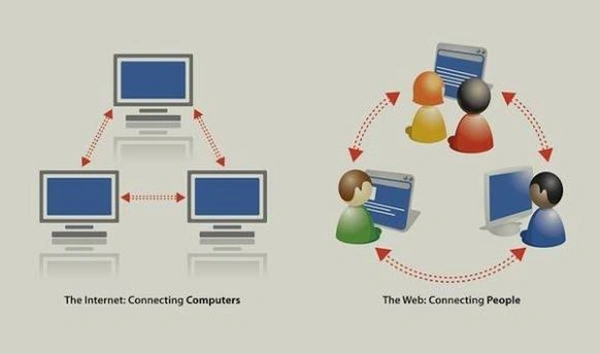
The terms “internet” and “website” are frequently confused, although they refer to different notions.
The internet means a worldwide network of cables and computers that is used to transport information, whereas a website is one of the sources accessed via that network.
The term “web” is often used as a synonym for the term “internet.” However, in reality, they are different concepts. The internet is a system of connected devices that is the basis of the web, while a website represents different sources utilized within the system.
A Brief History of Websites
The history of websites started with Tim Berners-Lee, a British computer scientist who created the World Wide Web while working at CERN (European Organization for Nuclear Research).
Here are some significant milestones:
- 1989: Tim Berners-Lee proposed a method of sharing information using hyperlinked documents.
- 1990: He created the first web browser and web server, as well as providing the basis for HTML and HTTP languages.
- 1991: The first website was made available online on http://info.cern.ch/ to describe the World Wide Web project.
- Today: Websites have evolved to become interactive media for communication and shopping, learning and entertainment, business and so on.
The initial website was rather simple and text-based. Nowadays, however, websites combine multimedia and interactivity, use databases and advanced technologies in order to create more sophisticated online experiences.
Web-page Meaning: What Is a Web Page?
When it comes to knowing what is web page is, it is a single document that can be found on the web, written with the help of HTML and opened in a browser.
Web Page vs. Website: What’s the Difference?
Although people often use these terms interchangeably, a web page and a website are different.
A webpage meaning is a more significant part of a whole. Whenever you click on a link that loads a new screen, you have likely moved to a different web page, generally still on the same site.
All too often, individuals confuse a web page with a website, but the truth is that they imply different things.
| Web Page | Website |
| A single document found online | A set of interconnected web pages |
| Has its own URL | Usually has one domain |
| Has a specific subject or type of information | Covers diverse subjects, products, or services |
| Example: A blog post | Example: Covers diverse subjects, products, or services |
Webpage example
A few webpage examples are as follows:
- Homepage – the primary page where users land; it mainly introduces the brand and informs where to find vital pages.
- Blog – information on a topic; it includes date, author, outside links, and so on.
- Product page – details about one product with images, price, and description.
- Contact Page: Contains contact details, locations, phone numbers, emails, and inquiry forms.
- Case Study Page: Showcases a real-life project or a successful story of a customer telling about a problem, a solution, and a result.
All web pages serve a certain purpose, but together they help users learn more about a website, search for the needed information, and perform any required actions.
Static vs dynamic web pages
Webpages can generally be categorized into two groups: static and dynamic. The key distinction is in the way the content of these pages is created, displayed, and updated.
Static Web Pages
A static webpage meaning is that, it contains fixed content that does not change for different visitors unless some technical work is done to modify the source code or files of the page. Static pages are often made in HTML and CSS and are good for simple websites with non-changing content.
For instance: Common About Us pages, business information pages, simple portfolio pages.
Dynamic Web Pages
A dynamic web page shows content that may differ from user to user depending on user action, preferences, database information, or other factors. Dynamic pages employ JavaScript, server programming, and databases to create personalized and frequently updated content.
For instance: Social media pages, online shopping pages, dashboards, and personalized account pages.
Moreover, static pages show largely unchanging details, whereas dynamic pages provide variable information according to users’ interactions or new information. There are some merits and demerits in both types of pages based on the specific needs and functions of the site.
How Does a Website Work?
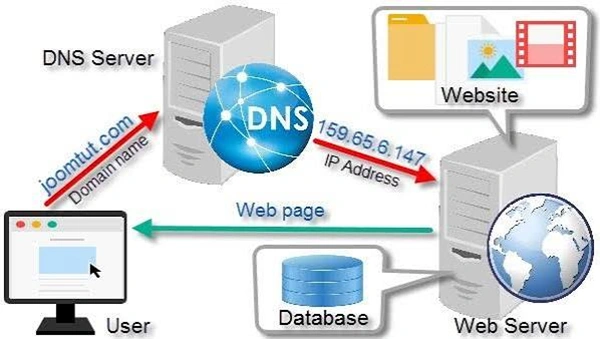
The way a website functions is by communicating between a web browser, a domain name system (DNS), and a web server. Specifically, upon entering the site’s URL into a browser, the request reaches the server where the site of interest is stored. After that the server would provide the client with the demanded files again to complete the process of loading the web page.
There are five necessary stages to go through:
Step1: Entering the URL
You input a specific web address, like www.example.com, in the browser’s address line.
Step 2: DNS query:
The Domain Name System (DNS) gets the IP address of the domain name in question to allow the browser to find the proper server.
Step 3: Browser request:
Your browser performs a request to the server using either HTTP or HTTPS or both.
The server response means that the server handles the requests before delivering the desired webpage files, namely HTML, CSS, JavaScript, and images, back to the browser.
Step4: The page display
It requires the browser to read the received files, integrate the content with the design elements, and display the final page.
Step5: Server response:
After receiving the request, the server processes it and returns the necessary files of the website, including HTML, CSS, JavaScript, and images to the user’s browser.
Display of page:
The browser gathers the files and displays the finished page based on the received information. Understanding the technical process is also useful when exploring what web development involves, from building a site’s structure to making its features work.
What Is a Website Made Of?
Website construction requires several components that work together to create access to the web platform that performs its function and serves its purpose.
Key Elements
A domain name is the name that people type in, to access the required web resource that can be registered with a domain registrar for a particular payment on an annual basis.
Web hosting is the service that provides web server space where the site files are stored and maintained.
Webpages are the unique documents that create a site, which may include About Us, Blog, Contact Us, and Service pages.
The homepage is the main page of the site that may be entered through the website’s root address.
Navigation: The means by which guests can traverse different pages using menus, links, and search tools. Simplicity in navigation determines whether site visitors will leave or stay on a webpage.
Design and Layout: Consists of various components like color schemes, fonts, spacing, pictures, and layout, which are integral to the website’s aesthetics both on desktop and on mobile devices. Designers use different tools to plan and create these layouts; our guide to web design software explains some of the options available.
Content: Content is comprised of articles, videos, pictures, sound files, and downloadable files that attract visitors’ attention on the website.
Security (HTTPS): Uses an SSL/TLS certificate that encrypts the information between a guest and a website and is represented by the padlock sign in the browser.
Three Languages Underlying Each Website
Almost all websites have these three languages working together:
- HTML (HyperText Markup Language): Defines the structure and content of the webpage, which includes headings, paragraphs, links, and images.
- CSS (Cascading Style Sheets): Controls the visual appearance of the webpage, including color, fonts, spacing, and layout.
- JavaScript: Makes the webpage interactive by adding some functionalities like drop-down menus, data validation forms, and content updates without reloading the page.
An easy way to grasp it: HTML is the bones, CSS is the skin, and JavaScript is the movement.
These components and technologies work together to turn website files into the pages and experiences that users view in their browser.
Static vs Dynamic Websites
Websites can be classified as static or dynamic, depending on how the content is composed, displayed, and updated. Both types help businesses and individuals promote their brand online, but their purposes are different.
We previously learned about static pages and dynamic pages. The same classification applies to websites depending solely on how their pages are created.
| Feature | Static Website | Dynamic Website |
| Content | Unchanging; all visitors see the same page | Changes based on the visitor or depending on requests or time |
| Page-making | Uses ready-made HTML pages placed on the server | Created on the spot by server-side code and database |
| Speed | Very fast, because pages are served as they are | Usually not very fast because speed varies between code, database and hosting |
| Updating | Simply upload new files | Update using content management systems or admin panel without any code changes |
| Best for | Portfolio, brochure, landing pages, event pages | Online stores, news sites, membership sites, booking systems |
Loading webpages: modern websites incorporate these two types at once. For example, it can be a business site having some static parts such as About and Services, while also having blog, contact, and shop sections.
Which one to choose for your project?
The static one is a good choice if you want to have a simple online representation of the business with not much change in the content. The dynamic one is more appropriate in case you need the availability of features suggesting intensive interaction with the user and regular content updates.
Types of Websites
Types of websites (with examples). There are many types of websites according to their function. Some sites are informational only, while others are focused on selling goods or providing services.
| Type | Purpose | Example | |
| 1 | Corporate website | Introduces a company and its products/services to capture customer interest | Tata.com |
| 2 | E-commerce website | Facilitates buying of products through a shopping cart and payment gateways Businesses that want to sell products online can consider specialist e-commerce website development to support product displays, shopping carts, and online transactions. | Amazon, Flipkart |
| 3 | Blog | Publishes regular articles in reverse chronological order | HubSpot Blog |
| 4 | Portfolio website | Displays the user’s or firm’s works to solicit clients’ interes | Behance profiles, designer websites |
| 5 | News website | Provides fresh news delivered in real time throughout the day | BBC News, The Hindu |
| 6 | Educational website | Provides educational material in the form of classes, lessons, and references | Khan Academy, Wikipedia |
| 7 | Booking website | Allows users to book hotels, flight tickets, restaurants, and appointments | MakeMyTrip, Booking.com |
| 8 | Portal/membership website | Offers account access, content, or services to users who logged in | Online banking portals, Netflix |
| 9 | Forum/community website | Allows members to post messages on happenings taking place in their lives | Reddit, Quora |
| 10 | Landing page | Single page designed to encourage clients to take action | Company launch and event campaign pages |
| 11 | Event website | Gives information about a particular event featuring schedule, speakers, place, and ticketing | Conferences and weddings |
| 12 | Personal website | Showcases the story about a person along with his/her hobbies and CV | Page with a personal story |
Real Website Examples from Digitaladdex
Exploring real projects lets us better understand various kinds of websites. Check out three websites created by Digitaladdex:
HellaBella Handcraft – E-commerce Site
This is an online shop where users can buy crafted presents, see product images, go through categories, and place an order easily.
Delhi Lawyers – Business Site
This is a professional website made for a legal company that provides information about the areas of practice and provides people with the opportunity to get in touch for a consultation.
Wander-Mint – Travel Site
This is a tourism-oriented website that allows tourists to see offers, learn about tourist destinations, and make reservations without much hassle.
These cases illustrate that although websites can have various designs and functionalities, they still accomplish the same goals, which is to meet the business targets and to satisfy the customers.
For larger and more complex digital projects, businesses may also benefit from enterprise web development tailored to their operational needs.
Website vs Web App
The distinction between a website and a web application can be understood easily, as both work over web-based browsers, but the objectives vary substantially between a website and a web application. The main function of a website is to provide content to whoever accesses it, while a web application gives users an opportunity to execute tasks that involve processing data.
The easiest way to determine whether it is a website or a web application is to remember that if the user is just visiting the page for information—it is a website, and if it does something with the content—it is a web app.
Sample web pages:
- Website: the company page which advertises its activities, products/ services, its portfolio, and contact details.
- Web app: any kind of platform like the one designed for online project management, where users can create tasks, hand over tasks to other users and keep track of their performance.
Where the line blurs
However, a large number of products are located somewhere between a website and a web app:
An e-commerce store is a website that can also help manage a shopping cart, create profiles, and manage orders online;
Many news websites include log-in functionality, allow for articles to be saved, and provide personalized news feeds. Likewise, web apps usually have a marketing website in front of them, such as the public pages of a project management tool before you sign in.
Why Do Websites Matter?
Despite the rise of social networks, marketplaces, and applications, websites are still the basis of any online presence. Here are the reasons.
Credibility.
Nowadays, people expect any business or organization of any level to have a website. A professional website proves you are a business, established, and trustworthy. Most of your clients will check your website before buying or calling.
Visibility.
A website allows you to rank in search results when a person is looking for the product or service you provide. Moreover, an optimized web page provides traffic around the clock.
Availability.
Your website is accessible 24/7. Customers can learn about you, book or contact you whenever and wherever it suits them.
Control:
Algorithms and regulations can be altered at any time on social media. When it comes to your website, you are responsible for the aesthetic choices, the background of the information you share, the data that you acquire, and the movement of your customers through it.
Growth:
Your website evolves together with your business. You can add new languages, pages, product samples, and software as your business expands and analyze the effectiveness of your website.
What Makes a Good Website?
A good website allows its users to perform the actions they want without any hassles. Regardless of the type, good websites usually have similar features.
- Clear purpose: Users should be aware of who you are and what you offer within a few seconds after they land on your page. These goals might differ from a mere page visit to completing a transaction.
- Easy navigation: A well-structured site with easy-to-use buttons and search options allows users to find information they are looking for in no time.
- Responsive design: As more and more users are visiting websites from mobile phones, it is important to ensure that your website is well-designed and readable no matter the size
- Fast page speed: If the loading time of a web page is slow, the website would have a higher chance of losing visitors and getting poor rankings in search engines. Images should be compressed properly, code clean, and hosting trustworthy in order to be able to load the pages promptly.
- Useful content: Clear, correct, and updated text together with relevant pictures and videos helps retain visitors. Thus, the content should be able to provide answers to people’s questions instead of simply taking up space on the page.
- Security: HTTPS, updated software, reliable passwords, and regular backups are required for the protection of users’ information and maintenance of the website’s reputation.
- Accessibility: Effective color combinations, fonts, image description texts, and the ability to use the keyboard allow more people to use the site.
- Search engine friendly: The existence of unique page names, meta-tag descriptions, headings, links, and URLs makes it possible for search engines to rate this page properly. Clear, descriptive URLs also help visitors understand where a page leads. Learn what a vanity URL is and how a memorable URL can support a consistent online presence.
How to Create a Website: A Simple Roadmap
Creating a website doesn’t have to be hard. You can simplify the process by thinking of it in terms of steps. Here are the ten steps to going from an idea to a fully functional website.
Identify your purpose and audience.
It’s important to know what your website aims to accomplish so you can better devise an essential plan.
Choose a domain name and register it.
Pick a domain name that reflects your brand and register it with a domain registry.
Select a hosting solution.
Choose the best hosting service for your website based on its expected traffic and basic tech requirements.
Pick a creation approach.
Choose between a website builder, CMS, or custom software development. If you are weighing a ready-made platform against a tailored solution, read our comparison of custom websites vs. website builders before choosing an approach.
Plan the site’s structure and pages.
Invent a sitemap that outlines the basic pages of your website and shows how they interlink.
Create a design and layout.
Choose a template design, or start one on your own based on your brand colors and styles, making sure that it is compatible with mobile devices.
Optimize for Search Engine Optimization and Mobile Devices:
Incorporate required keywords, descriptive page titles, mobile-friendly templates, optimized images, and website URLs.
Test the Website for Launch:
Perform checks on the links, forms, navigation, loading speed, mobile friendliness, and security before making the website live.
Regular Maintenance and Updates:
Regularly update content on the website, install updates for security, monitor performance, create backups, and troubleshoot and address technical errors. Ongoing care helps keep a website secure and functional; explore our website maintenance services for support with updates and upkeep.
Three Common Approaches to Website Development
There are three basic options for creating a website, depending on your budget, required level of technical know-how, level of customization required, and website requirements.
Website Builders
Website builders like Wix or Squarespace allow you to use templates in the creation process of your website due to their drag-and-drop feature. Before selecting a platform, you can also review the pros, limitations, and use cases in our guide to a DIY site builder.
Content Management Systems
Some platforms, such as WordPress, allow you to create and manage the content of your website.
Custom Website Development
For custom website development, developers create a website according to the client’s needs by utilizing different programming languages.
Frequently Asked Questions
How can you describe a website in simple words?
A website is a collection of web pages that share a unique address or domain name and can be accessed on a web browser. A web page is located on an electronic computer that is used as a web server. The web page can be accessed by anyone who has an internet connection.
What do you mean by web page?
A web page is known as a specific document available on the internet and has its unique URL and is opened on a browser. The content on web pages is mostly in the form of HTML documents containing text, images, videos, and hyperlinks. Some of the examples are blogs, home pages, or contact pages.
Website versus web page
A web page can be described as a single page, such as example.com/about, whereas a website is a collection of web pages on the same domain. It is similar to a book where the web page is a chapter and the website is the whole book.
What Is An Example of a Web Page?
Most web pages consist of a home page, a blog post, a product page, a contact page, and a case study page. A certain instance will be. In the case of an e-commerce site, each of the products has different web pages where their images, texts describing the function and prices are displayed.
What Types of Websites are?
Many website types business website, e-commerce website, blog, portfolio website, news website, education web site, booking website, members site, forum, landing page, event web site, and personal website.
Wrap Up
A website is a sort of collection of different web pages that allows people and companies to exchange information online, to promote their products, and communicate with an audience. Understanding the way websites function and the different types will help you prepare a successful online presence.
Do you need a website for your business?
Feel free to contact Digital Addex for website design and development.