The cornerstone of an effective website isn’t design or copy; rather, the main element is the structure. If a building needs a blueprint, a website should equally have a successful plan for organizing pages.
Website tree structure is also known as the page tree or website design tree. This structure is generally a visual representation of a website’s page organizational structure. It shows a connection between the home page and the main categories, subcategories, and individual pages, helping designers, developers, and content teams find common ground about the whole website.
In this comprehensive guide, we will reveal how to create a website tree, principles of proper tree creation, and common mistakes to be avoided in the process.
So let’s dig in.
Tree Metaphor
The metaphor is effective because it precisely demonstrates the way a tree develops:
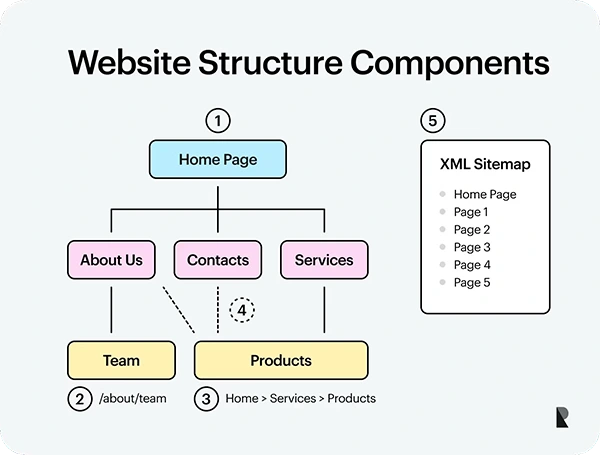
Trunk: The Home page. Everything begins with this page, for it serves as a point of entry for the whole structure.
- Branches: The main categories and sections, which are represented by the main navigation items, such as “About”, “Services”, “Shop”, “Blog”, etc.
- Leaves: The sub-pages, products, or any other content, like a separate product page, a piece of writing, a case study, a contact form, etc.
The first step to building a website is to create a site design tree. But this is not just the planning stage; it’s an important step that impacts UX, SEO, and the efficiency of your web design project. A well-structured tree makes it easier for users to find information on the website and enables search engines to better understand the essence of the content. The importance of creating a tree is that it avoids structural mistakes during the development stage.
What is Website Tree Structure?
Creating a website tree structure means designing a hierarchy of the website. It defines what pages exist on the site, what their relationships are, and what depth other levels of the hierarchy should be. It explains how all pages of your website connect, starting from the homepage and finishing with other levels of the hierarchy.
Website Tree vs. Navigation Menu vs. Sitemap
Website tree: The website tree refers to a planning tool that contains all the necessary web pages, including pages that is not shown on the main navigation.
Navigation menu: A navigation menu can be thought of as an end-user tool. Though the navigation menu is based on the website tree, it does not necessarily have to look the same; for example, the website tree may have multiple pages of blog articles while the navigation menu may contain only one Blog link.
Sitemap: It can be used in two contexts:
- XML sitemap – a file that allows the search engines to crawl the website.
- HTML sitemap – a file that enables users to navigate through the website content.
The key difference is that a website tree is a tool mainly used for planning, whereas a sitemap is meant to present the content of the website in a web format.
A site tree can help build a navigational menu, but the two are not the same. While the site tree is a complete representation of all of the pages on the site, even the pages that are not accessible from the main menu (for example, thank-you or legal pages or far-off products). The sitemap, on the contrary, is a curated selection of pages that constitute a guide that guides a visitor when they want to access the contents of the site.
Visual Representation:
The visual aspect of the website tree can be exhibited as an organizational diagram. The homepage is usually at the top of the tree, with branches going downwards. Canva, SmartArt, Creately, and some specific site mapping & diagramming tools.
Why a Website Design Tree is Essential
A website design tree is helpful not just in organizing pages but also in developing an efficient & user-friendly website that is easy to manage. Developing the structure of a website allows for more effective decisions regarding navigation, content, and links between pages.
When planning the structure of a website, businesses can also benefit from professional web design services to ensure that the planned hierarchy supports both usability and visual presentation.
Improves User Experience (UX)
Intuitive Navigation: With a well-designed website tree, users can navigate easily. The tree will help users find the information they are looking for effortlessly. Combining a good structure with an intelligent UI allows users to see where they are and where they can navigate. For example, one can categorize products in an online shop in the following way: Men’s Clothing → Shirts → Casual Shirts. It would allow users to navigate the products without difficulty.
The 3-Click Rule: The 3-click rule is one of the well-known guidelines stating that the user has to get to an important page within three clicks. It is a useful reminder to keep navigation from being unnecessarily deep or complicated.
Nevertheless, it is not an absolute usability principle. A website could easily be usable when it takes more than three clicks to find the needed page, as long as the path is clear.
Reduces Bounce Rate: The easy navigation makes it easy for visitors to discover more of its content, leading to a decrease in bounce rate. For example, a blog with informative categories and links to relevant articles increases the chances of readers reading one article and moving onward to another useful page.
While bounce rate is affected by numerous elements, such as quality of the content, loading speed, and the reason for visiting, a website tree does help with the bounce rate but does not fully guarantee it.
Boosts Search Engine Optimization:
A good website tree makes an effective basis for SEO. It tells search engines how to understand the structure of your content and which pages are more important.
For search engines to “climb” websites, they follow the same scheme as if they were climbing through a tree: they start from the trunk and move left and right.
Improved Indexing: The logical structure helps search engines like Google to find and read your pages. A website tree with clear navigation, descriptive URLs, and useful internal links can help with crawling and indexing. Nonetheless, a website tree alone will not ensure that all pages will be indexed
Keyword and Topic Clusters: This defines the concept of a topic cluster, which considers a core page that describes the general subject and various other pages giving more detailed information on the topic. Such an arrangement helps search engines understand the relationship between topics and facilitates writing quality content.
For example, a website devoted to digital marketing might have a principal sub-heading on SEO with several other pages dedicated to topics like keyword optimization, technical SEO, and link creation.
Internal Linking: An organized structure makes it simpler to develop internal links between relevant pages. For instance, if a blog post on keyword optimization is published, it might direct visitors to a general SEO guide, and vice versa.
Such links help people to come across relevant information and facilitate search engines in understanding links between pages.
Streamlines the Design and Development Process
A website tree can also serve as an efficient project management tool. It provides all stakeholders involved in the website with an understanding of what has to be created.
- Simple Blueprint: The tree functions as a blueprint for web designers, content writers, and developers. The designers can plan the layout of the pages in accordance with the information about the sections they contain, which will be provided by the content writers.
- Efficient Procedure: When the structure is decided at an early stage, the teams do not have surprises. They know what pages are to be constructed, what content is to be developed, and how these parts will be linked. This eliminates the confusion, avoids situations when work is repeated, and facilitates the identification of the content that has not been created yet.
- Defines Scope: A website hierarchy makes it possible for the interested parties to see the whole project. It facilitates agreement on: What pages will make up the initial version? Which sections will be added at a later stage? What content should be generated? How much design and development effort will be put in?
For example, a hierarchy that includes Homepage → Services → 10 individual service pages gives much better understanding of the project than just saying “We need a services section.” For larger websites and complex structures, scalable enterprise web development can help accommodate multiple sections, services, and content categories.
A Step-by-Step Guide to Creating Your Website Tree
The procedure to creating your web design tree is about transforming the objectives and content of your website into an orderly framework. It is advisable to begin the process by identifying what is needed by your users. Afterward, it is necessary to categorize the pages and put them to the test before actual development starts. Here is a step-by-step guide to creating a website tree
Step 1: Specify Your Website Goals
Before you draw anything, you should determine the main aim of your website – lead generation, e-commerce sales, brand awareness, or dissemination of information. The aim will determine the content of the trunk and branches.
Step 2: Manage a Content Inventory and Audit
When you are done deciding how pages must be positioned, it is essential to know what content you have. You ned to categorise
- Content inventory. Prepare a list of all content, including pages, articles, blogs, etc. If you are about to create a new website, list the most important topics to be covered.
- Content audit. Examine the current content to decide what is useful, what is missing, what has to be changed, and what can be deleted.
Step 3: Place Content into Groups
Group the pages that are related. Ask yourself what the judicious first click should have been if the user wanted the information you have in a particular group. This way, you will get your first-level branches. Link similar pages together. Ask yourself: “If I’m the user, what would be the first thing I click on?” This will give you your Level 1 branches.
Step 4: Set Up the Hierarchy and Parent-Child Links
Establish the status of each page: parent (category) or child (sub-page). All leaves must have only one parent. Every sub-page must have one parent only.
Step 5: Create a Visual Map
Take a diagramming tool and map the hierarchy visually — homepage at the top, branches below it, leaves below those. This is the reference document for the project team.
Step 6: Test through User Flows
Follow the tree as if you are the user with a specific need (“I want to book a demo,” “I want to check prices”). If the route is not clear in 2-3 clicks, recheck the structure.
Step 7: Build the URL Structure Together with the Tree
A cleanly built tree leads to clean URLs too, e.g. /services/web-design/branding. Develop URL slugs in accordance with the created tree.
A well-planned URL structure is particularly important when implementing professional website development services because it helps maintain consistency as new pages are added.
Step 8: Make Sure to Get Approval from Stakeholders
Send the tree to designers, developers, content authors, and stakeholders. Making structural modifications now is inexpensive, but can be costly down the road.
Best Practices for Tree Web Design
A well-designed page tree should be easy to understand, easy to create, and have flexibility for future growth.
- Keep it Simple. The number of clicks from the main page to any site within the tree should not exceed four. While there might be sites that require several layers of hierarchy, you should limit their number. There is no point in hiding important pages several categories deep.
- Be Consistent and Clear. Navigation titles should be based on real-life words used by users, rather than on internal terms.
- Pay Attention to the URL Structure: The URL should reflect the hierarchy of your website if possible. A good URL structure shows visitors where they are located and helps with crawling by search engines.
- See Your Tree in ASCII or Visual Form: The website tree could be built as text-based ASCII trees or as visual diagrams depending on the purpose. ASCII trees are good for preparing drafts, planning documents, and brainstorming sessions with the team.
- Do not Have Orphan Pages. Each of the pages should have a parent page, which should be accessible through navigation.
- Create a Balance of Breadth and Depth. Too many branches on the top level will confuse users, while too few will make them drill down.
- Design for Growth. The structure should have the size and space to accommodate more content in the future, without requiring redesigning of the whole website.
- Keep Note of the Plan: The tree should not be just something that exists in somebody’s mind. The tree should be put into paper or visualized.
For e-commerce websites, a clear hierarchy is especially important when planning e-commerce website development, as products, categories, and subcategories need to be organized logically.
Wrap Up
Creating a website tree is an essential step in establishing what will determine your web project’s success. It allows for easy creation of the website structure, facilitates visitors finding the necessary information, and provides the basis for the SEO and web development process.
In this guide, we examined how a website tree makes the user experience better, improves SEO, and makes the website design process more manageable. Starting with the goal-setting step through organizing information, URL planning, and testing the hierarchy, we looked at every step in the website tree creation process in detail.
The time you spend creating your website tree at the beginning will save you a lot of time and nerves in the future.
A properly organized website structure serves as the foundation for a well-functioning, convenient, and informative website. Once the website structure is live, ongoing website maintenance can help keep pages, links, navigation, and other website elements properly managed as the site grows.
Are you ready to get started on your own website structure?
Take the first step by clearly defining the goals of your site, followed by creating a comprehensive list of pages and structuring them into a hierarchy.
Be flexible with your website structure and feel free to change it if it does not seem right! The most effective trees do not have to be very complex—they just need to work for the users.
Start working on your website structure today to get a remarkable result tomorrow.